Frutiger Home aquarium setup
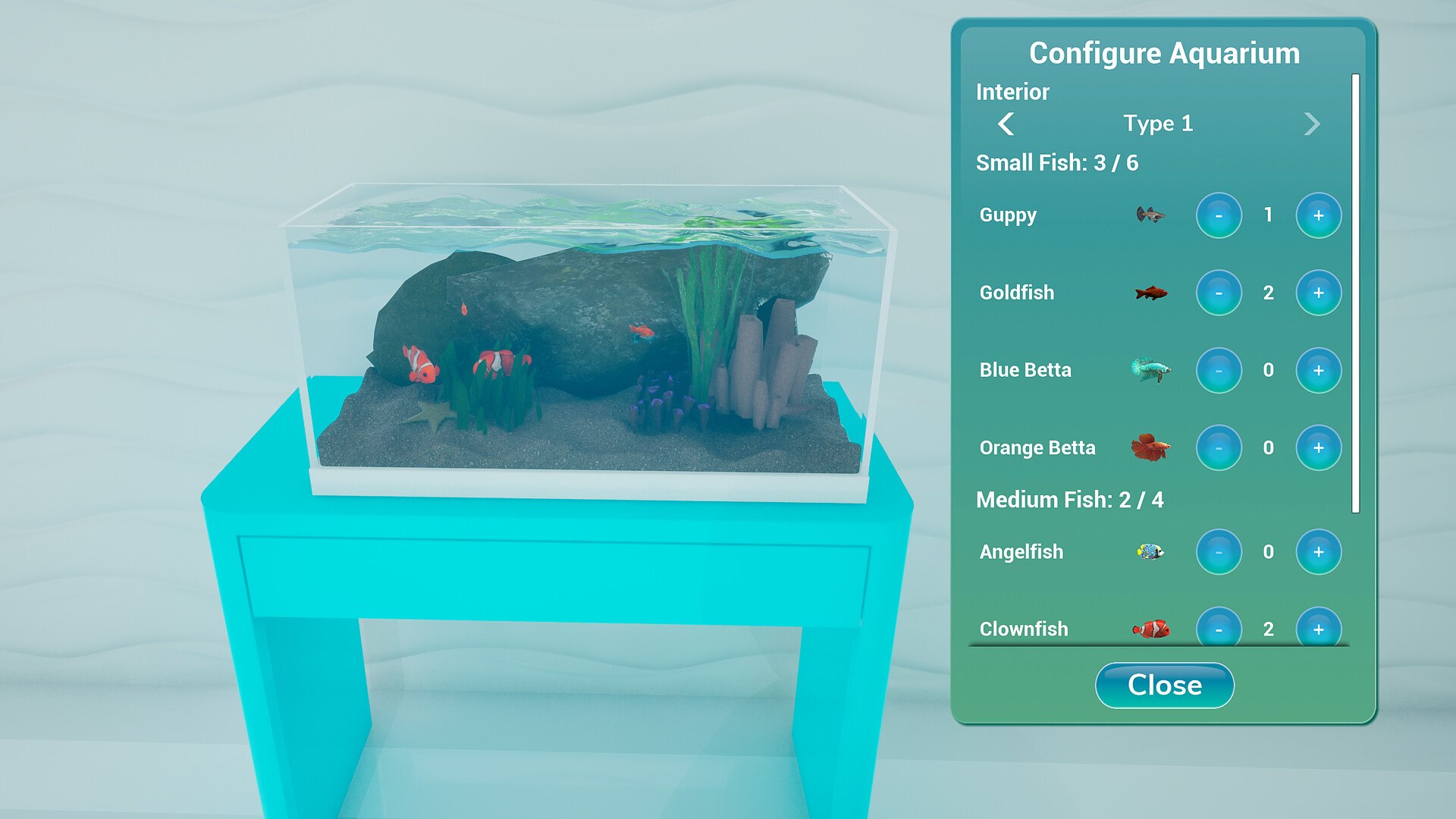
Configure Aquarium opens from the tank: pick an interior, then add or remove fish with the plus and minus buttons. Lights are the fiddly part.
Short answer
Aquariums are configured from a window called Configure Aquarium, opened from the tank itself. You choose an Interior type, then stock the tank with fish in two size classes: up to 6 small fish and up to 4 medium fish. The stock list in the official screenshot names Guppy, Goldfish, Blue Betta, Orange Betta, Angelfish and Clownfish, each with a minus button, a count and a plus button. Lights are the acknowledged awkward part.
The window, element by element
Transcribed from the official Steam screenshot of the demo build:
| Element | Visible text |
|---|---|
| Window title | Configure Aquarium |
| Habitat row | Interior — Type 1 (left/right arrows) |
| Small fish capacity | Small Fish: 3 / 6 |
| Small fish list | Guppy · Goldfish · Blue Betta · Orange Betta |
| Medium fish capacity | Medium Fish: 2 / 4 |
| Medium fish list | Angelfish · Clownfish |
| Button | Close |
In the screenshot's example tank the counts add up like this:
| Fish | Count shown | Class |
|---|---|---|
| Guppy | 1 | Small |
| Goldfish | 2 | Small |
| Blue Betta | 0 | Small |
| Orange Betta | 0 | Small |
| Angelfish | 0 | Medium |
| Clownfish | 2 | Medium |
| Total | 5 fish | 3 small + 2 medium |
So the two capacities are independent: three small fish do not consume any of the medium-fish allowance. That is the part most people get wrong when they plan a tank.
How to approach a tank build
- Pick the Interior type first. It is the top row and it is not a decorative afterthought — it sets the tank's look, and the fish are what you layer on top.
- Fill the small class first if you want movement, the medium class first if you want presence. Small and medium are separate budgets (6 and 4), so a tank with a few medium fish still has room for a shoal of the little ones.
- Use the plus/minus buttons per species. Each row is an independent counter; a species at 0 is not "disabled", it is just empty.
- Plan the lights before you fall in love with the tank. See the complaint below — lighting is the part players report fighting with.
- Remember the aquarium is furniture. It is placed in the room like any other item, so its position interacts with your wall openings. Put it somewhere it can be seen from the room's main angle.
The light complaint
Two demo-period threads are specifically about aquarium lighting:
- 1 July 2026 — the aquarium table light was described as wonderful once placed, but when rotated in the catalogue you can see a plain black base behind the backdrop. A visual defect, reported, not confirmed as fixed.
- 18 September 2026 — a request for a light toggle for fish: the player found a "roundabout way" to light them up, adding that it is hacky and hard to position.
Practical read: light placement is fiddly, the community noticed, and there was no official fix or toggle confirmed before launch.
Known gaps
| Question | Status |
|---|---|
| How many Interior types exist | Not published — the screenshot only shows "Type 1" |
| Whether more fish species unlock later | Not published; no unlock structure is described anywhere official |
| Whether fish needing specific water types exist | Not published |
| Light toggle / better light placement | Requested twice, not confirmed |